
● Daily Digest
AI Assistant
Good morning, Sarah. Here is your overview for Friday, Jan 24.
We’ve detected 3 high-priority notifications that require confirmation.
Generated today at 8:00 AM
● Weekly Revenue
+4.2% Growth
Accumulated Sales
$124,500
+$5,230 Today
Mon
Wed
Sat
● Ad Spend Audit
Attention
Ad Spend +2.1%
ROAS: 18.2%
Coupons -0.5%
1,200 Redeemed




Introducing Slackbot


Power of agents
Agents @ your command
Type @ and pick your specialist: Analytics, Retention, Inventory, Ad Spend, Fulfillment, whatever the moment calls for.
Ask Analytics why conversion dipped Tuesday, or loop in Fulfillment the second a shipment starts running late.
They sit right in your channels, ready when you need them, quiet when you don't.


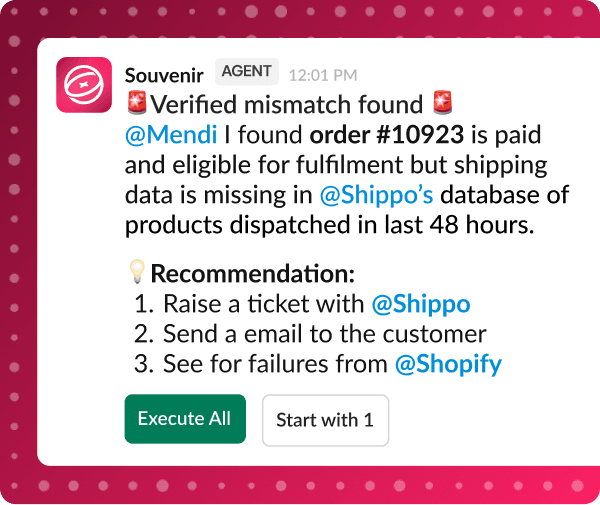
Always watching for problems.
Never acting without you
Souvenir plugs into the tools you already run your store on, quietly reading your orders, ad spend, and inventory in the background.
Catch a sudden spike in returns on one SKU, or CAC creeping up on a campaign, before it turns into a real headache.
Before it touches anything outside that, pauses an ad set, updates a listing, pings your 3PL, it asks. Allow once, allow always, or block. Your call, every time.




3000+ Connectors
Shopify, Klaviyo, Meta Ads, Stripe, QuickBooks, and everything else your store runs on. Souvenir plugs in, triggers actions, and keeps your numbers in sync, right where your team already works.















Testimonials
FAQ
What does Souvenir do?
Souvenir runs the recurring work in your ecommerce business. It connects to your store, ads, email and support tools, then a roster of Specialists handles the repeat jobs and flags problems early. Ask a question in Slack and get an answer in seconds, or hand over a job that runs on a schedule. You approve anything that changes your store.
Does my team need to learn another app?
No. Most teams work from Slack. Tag Souvenir in a channel, ask in plain English, and the answer comes back in the thread. If you are not on Slack, the same Specialists and the same company memory are in the Souvenir app. Set it up in one place and it shows up in the other.
Do I have to set it up myself?
No. We implement Souvenir with you, train your team, and build the first automations together. On your side it starts with two things: tell Souvenir your store so it can fill its own company memory, then connect your tools, a few clicks each. How long that takes depends on how many tools you connect.
Will it do things without my approval?
Not unless you ask it to. By default Souvenir reads first, suggests second, and waits for your OK before it sends, publishes or changes anything in your tools. You can widen that for work you trust, like a weekly report, and keep approval on anything that touches customers or spend.
What happens if a Specialist gets something wrong?
You see the work before it goes out, so most of it gets caught at the approval step. Every job shows what it looked at and what it changed, so you can check the reasoning. Tell the Specialist what was off and that correction goes into your company memory, so the next run reflects it.
Is my store data safe?
Your data stays yours. Souvenir connects through each tool’s official login, reads what the job needs, and keeps each store’s context separate. You can see which tools are connected, what each Specialist is allowed to reach, and you can pull access from any of them at any point.
How is this different from an AI chat tool?
A chat tool starts from nothing every time you open it. Souvenir keeps your company memory, so it already knows your products, your voice and how you work. It also reaches into your tools: it can pull yesterday’s orders, catch an email flow that stopped sending, and do the work in the tool instead of describing it.